

Welcome to the October Support Newsletter!
We’ve noticed a significant number of support calls regarding the CefSharp error mentioned in last month’s newsletter, so we’re addressing it again here.
Additionally, we have a section on user permissions. Some settings are managed within the program itself rather than through Sage 200 Admin. We often receive calls about users who, despite having the same setup as their colleagues, are unable to modify certain fields in Sage 200.
Sage 200
IMPORTANT
We have received a number of calls recently where users are regularly receiving this error message at any time and anywhere in the program. Sage have advised that the file/s CefSharp are being quarantined by firewall or antivirus. The resolution steps below will need to be processed by your IT Support Team.

- Ensure that all Windows updates have been applied to the server/remote desktop server
- Ensure Sage is not being used and go to the Server that has the Client installed on and open the registry editor.
- Locate HKEY_CURRENT_USER\Software\Sage\MMS
- Once located right click on the right-hand screen on the line that says ClientInstallLocation and select modify. This then will give you the value data. Copy this then close Registry Editor.
- Open File explore and paste the path you copied on line 3
- Browse down to the CefSharp lines. These potentially are what are getting quarantined by either a firewall or Antivirus software once the program is opened therefore leading to the errors.
- These then need to be allowed through the customers security.
If the issue persists after following these steps, please reach out to us for further assistance.
Invoice and SOP Order Permissions
By setting invoice and order permissions within the relevant modules, you can control what users can view and modify. To do this, navigate to the Sales Order Processing or Invoicing module, then select Utilities > System Set Up > User Permissions and configure the permissions as needed.
You have the flexibility to specify various permissions, such as:
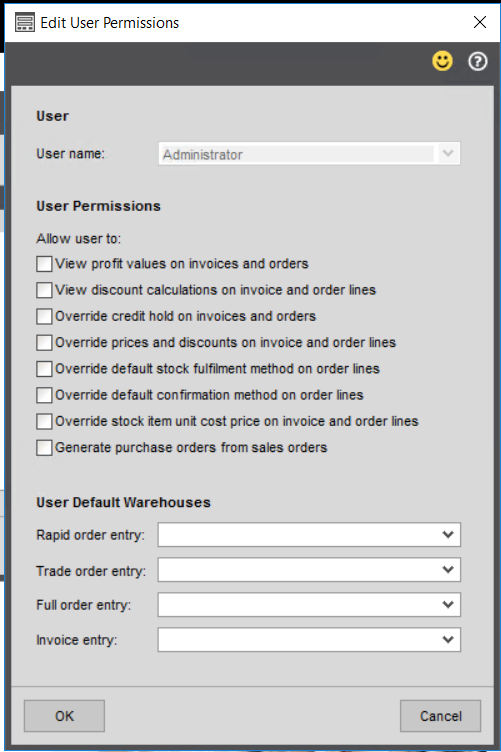
Configuring user permissions correctly is essential for optimising your Sage 200 system.
Report of the Month
This month’s offering is Monthly Invoiced Quantities by Product Group and Stock Code. This report provides you with 12 months’ worth of stock quantities sold by product group. Please click here to view an example of the report.
If you would like this report added to Sage 200, please contact us.
Cim200
New Release – Cim200 v2024 R3 SP1
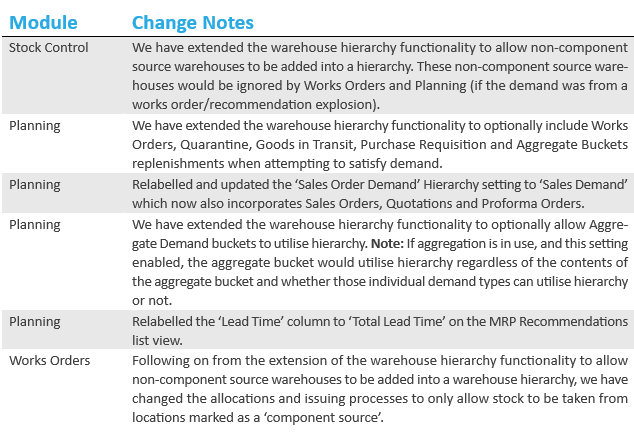
The latest release of Cim200, v2024 R3 SP1 was released yesterday. This release is compatible with Sage 200 Professional v2022 R1 onwards and contains some minor improvements.
CIM Support
The CIM support desk is available Monday to Friday to assist with your software queries. Each morning, we hold a meeting to discuss all support cases and collaborate on resolving them efficiently.
Our working hours are:
- Monday 0800 – 1630
- Tuesday 0800 – 1630
- Wednesday 0800 – 1630
- Thursday 0800 – 1630
- Friday 0830 – 1600
Support calls received via telephone, email, or our website are logged and addressed in priority order according to our Service Levels outlined in the Support Agreement.
Calls received outside of our working hours will be responded to on the next working day.
We hope these guides/articles will be of assistance, however, if you wish to discuss these further, please contact the support team by clicking the button at the bottom of this newsletter.